|
|
Hello, WinForms Example Code:
private void pdfViewer1_MouseClick(object sender, MouseEventArgs e)
{
    if (e.Button == MouseButtons.Right)
    {
        MenuItem[] items = {
            new MenuItem("Cut", (s, args)=> Pdfium.FORM_OnChar(pdfViewer1.FillForms.Handle, pdfViewer1.CurrentPage.Handle, 24, KeyboardModifiers.ControlKey)),
            new MenuItem("Copy", (s, args)=> Pdfium.FORM_OnChar(pdfViewer1.FillForms.Handle, pdfViewer1.CurrentPage.Handle, 3, KeyboardModifiers.ControlKey)),
            new MenuItem("Paste", (s, args)=> Pdfium.FORM_OnChar(pdfViewer1.FillForms.Handle, pdfViewer1.CurrentPage.Handle, 22, KeyboardModifiers.ControlKey))
        };
        var menu = new ContextMenu(items);
        menu.Popup += (s, args) =>
        {
            items[0].Enabled = items[1].Enabled = pdfViewer1.FillForms.SelectedText != "";
            items[2].Enabled = pdfViewer1.FillForms.InterForm.Controls.GetFocused() != null;
        };
        menu.Show(pdfViewer1, e.Location);
    }
}
WPF Example: Code:
private void pdfViewer1_MouseDown(object sender, MouseButtonEventArgs e)
{
    if (e.RightButton == MouseButtonState.Pressed)
    {
        MenuItem[] items = {
                new MenuItem() { Header = "Cut", Command = new ClipboardCmd(pdfViewer1, "X") },
                new MenuItem() { Header = "Copy", Command = new ClipboardCmd(pdfViewer1, "C") },
                new MenuItem() { Header = "Paste", Command = new ClipboardCmd(pdfViewer1, "V") },
            };
        var menu = new ContextMenu();
        menu.ItemsSource = items;
        menu.IsOpen = true;
    }
}
Code:
class ClipboardCmd : ICommand
{
    private PdfViewer _viewer;
    private string _mode;
    public event EventHandler CanExecuteChanged;

    public bool CanExecute(object parameter)
    {
        if(_mode=="C" || _mode =="X")
            return _viewer.FillForms.SelectedText != "";
        if(_mode =="V")
            return _viewer.FillForms.InterForm.Controls.GetFocused() != null;
        return false;
    }

    public void Execute(object parameter)
    {
        switch (_mode)
        {
            case "X":
                Pdfium.FORM_OnChar(_viewer.FillForms.Handle, _viewer.CurrentPage.Handle, 24, KeyboardModifiers.ControlKey);
                break;
            case "C":
                Pdfium.FORM_OnChar(_viewer.FillForms.Handle, _viewer.CurrentPage.Handle, 3, KeyboardModifiers.ControlKey);
                break;
            case "V":
                Pdfium.FORM_OnChar(_viewer.FillForms.Handle, _viewer.CurrentPage.Handle, 22, KeyboardModifiers.ControlKey);
                break;
        }
    }

    public ClipboardCmd(PdfViewer viewer, string mode)
    {
        _viewer = viewer;
        _mode = mode;
    }
}
|
|
|
Hope someone could point me in the right direction. I'm using PdfViewer to display a document with acroforms. My task is to provide the normal Cut/Copy/Paste functionality for text fields on the document via a context menu. I followed the suggestion in https://forum.patagames....xt-menu-in-WPF-PdfViewer to create the context menu, however, every time I right-click on a field, the menu comes up with all three items disabled (see the image). 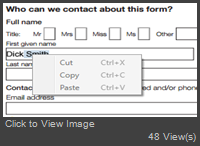 I know that the corresponding keyboard shortcuts Ctrl+X, Ctrl+C, Ctrl+P work just fine, but I need the same functionality available via a context menu. Is this possible?
|
