|
|
Hi, thanks for the prompt replies!! Here is the original document. I've tried to save using all the enums available, but didn't seem to help.  ATO - clearance certificate application.pdf (290kb) downloaded 22 time(s). ATO - clearance certificate application.pdf (290kb) downloaded 22 time(s).Thanks!
|
|
|
Could you also provide original document?
Also try to save document in incremental mode.
|
|
|
Hi Thanks for getting back to me! Yeah sure, please see the document attached. The original version of this document can edit fine. If we then add the "TM" and save it using the save methods, we get the error below. ATO - clearance certificate application (1).pdf (356kb) downloaded 21 time(s).Thanks
|
|
|
Could you please provide such PDF document
|
|
|
Hi We're using the WPF version to modify form fill documents (we add a "TM" value to the field dictionary). When we add these values and then save the document, it's no longer possible to edit the document in Acrobat Reader DC. Most of our clients are using this reader. It's fine in Chrome and in the WPF viewer though. I was wondering if there is a way to prevent this from happening. I've attached the error message below. Thanks for your help! 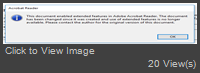
|
Important Information:
The Patagames Software Support Forum uses cookies. By continuing to browse this site, you are agreeing to our use of cookies.
More Details
Close
