|
|
I guess this is combination of the Quote:MaxLen integer (Optional; inheritable) The maximum length of the field’s text, in characters. and Quote:FieldFlags: bit position 25: Comb - (PDF 1.5) Meaningful only if the MaxLen entry is present in the text field
dictionary (see Table 8.78) and if the Multiline, Password, and FileSelect
flags are clear. If set, the field is automatically divided into as many equally
spaced positions, or combs, as the value of MaxLen, and the text is laid out
into those combs. Therefore, you can read/set this value in the field's dictionary by reading/setting the MaxLen value and the corresponding flag. Code:using(var doc = PdfDocument.Load(@"e:\31\comb.pdf_decoded.pdf", new PdfForms()))
{
var field = doc.FormFill.InterForm.Fields[0];
var dict = field.Dictionary;
int flags = field.Dictionary["Ff"].As<PdfTypeNumber>().IntValue;
int maxLen = field.Dictionary["MaxLen"].As<PdfTypeNumber>().IntValue;
bool combIsSet = (flags & 0x1000000) == 0x1000000;
field.Dictionary["MaxLen"] = PdfTypeNumber.Create(15);
doc.Save(@"e:\31\comb15.pdf", SaveFlags.NoIncremental);
}
The full description of all available flags can be found on pages 676, 686, 691, 693 of the PDF specification here: https://www.adobe.com/co...ve/pdf_reference_1-7.pdf
|
|
|
In Adobe Acrobat a property can be set to give spacing between characters (called comb). Is there a way to use this setting in pdfium currently? 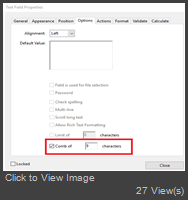
|
Important Information:
The Patagames Software Support Forum uses cookies. By continuing to browse this site, you are agreeing to our use of cookies.
More Details
Close
