|
|
|
|
|
I'm impressed. Thanks.
|
|
|
We have already fixed both issues. At the moment, testing is in progress. The first issue is the blurring of text in the WPF Viewer The second issue is actually a ClearType problem. 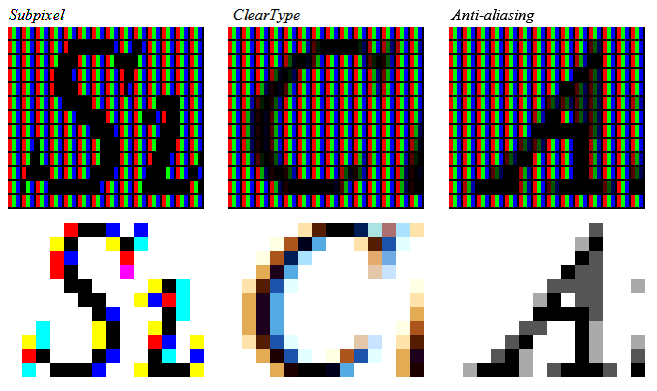 So the viewer display text in anti-aliasing mode instead of ClearType mode as should be if LCD_TEXT flag is used.
|
|
|
I will. I noted the fix above wasn't sufficient shortly after my last reply. I appreciate the heads up.
Do I understand the colored text rendering is impossible as of now ? With the fix bringing back rendering to an acceptable level, this is fine with me. I'd just like to have an understanding about that.
Also I have offered to send a Pull Request on GitHub, is this part of your policy ?
|
|
|
We will release a fix on this week. Please use this one instead of the code above. The fixes much more complex. You will find the differences on github.
|
|
|
So it is, rendering now produces expected result, thanks.
What ought to be done to upgrade the greyscale text to color shaded text, as seen in Chrome's rendering ?
|
|
|
We will release a hotfix for these issues on this week I hope. Thank you for the bugreport. By the way The code should be as following Code:public static void DrawImageUnscaled(DrawingContext drawingContext,
WriteableBitmap wpfBmp,
double x,
double y)
{
drawingContext.DrawImage(wpfBmp,
new Rect(x,
y,
wpfBmp.PixelWidth*96/Dpi),
wpfBmp.PixelHeight*96/Dpi)));
}
|
|
|
You are correct, the blurry issue lies in the WPF rendering. The LCD flag was already activated. I had tried running experiments with the flag on and off, without significant results. There is in fact an issue with the Rendering procedure: Points/Pixels conversions compute larger Bitmaps sizes than what is really being displayed on screen. This results in Downsampling and Blurry text when it is scaled back to fit the screen. It is especially prominent when rendering small Zoom factors, since Bitmap scaling is rather efficient and doesn't produce much artifact with larger fonts sizes. Here is a quick hack which produces correct results (find image comparison at the end): PdfViewer.csCode:protected virtual bool DrawPage(DrawingContext drawingContext, PdfPage page, Rect actualRect)
{
if (actualRect.Width <= 0 || actualRect.Height <= 0)
return true;
//int width = Helpers.PointsToPixels(actualRect.Width);
//int height = Helpers.PointsToPixels(actualRect.Height);
//if (width <= 0 || height <= 0)
// return true;
//var pageRect = new Int32Rect(
// Helpers.PointsToPixels(actualRect.X),
// Helpers.PointsToPixels(actualRect.Y), width, height);
var pageRect = new Int32Rect(
(int)actualRect.X,
(int)actualRect.Y,
(int)actualRect.Width,
(int)actualRect.Height);
return _prPages.RenderPage(page,
pageRect,
PageRotation(page),
RenderFlags,
UseProgressiveRender);
}
Helper.csCode:public static void DrawImageUnscaled(DrawingContext drawingContext,
WriteableBitmap wpfBmp,
double x,
double y)
{
drawingContext.DrawImage(wpfBmp,
new Rect(x,
y,
/*PixelsToPoints*/(wpfBmp.PixelWidth),
/*PixelsToPoints*/(wpfBmp.PixelHeight)));
}
I put together an image comparison (click) of Chrome Rendering, Original WPF Rendering (blurry), Bitmap Rendering (Page > Bitmap > PNG file) (non-blurry), and fixed WPF Rendering (equivalent to Bitmap). In addition to the blurry issue now identified, if you zoom on the Image comparison above, you will note that Chrome uses colors for its font rendering. Because of their intensity, as opposed to Greyscale only, it produces a thinner and more pleasant rendering. How could we activate this feature ? Kind regards, Alexis
|
|
|
When comparing PDFium rendering (based on the WPF PdfViewer) with Chrome PDF rendering, or even Adobe, Foxit Reader, it appears these latters produce thiner text. As demonstrated here with a random PDF document (Top = Chrome, Bottom = PDFium): https://imgur.com/Dg2VHASWhile it isn't shocking at first, long reading sessions generate more strain on the eyes than their thinner counterpart. As far as I can tell, this behavior cannot be changed from outside the PDFium DLL. What workaround would you suggest ? I attached the PDF document in case it would be handy. Thanks, Alexis  test2.pdf (1,004kb) downloaded 39 time(s). test2.pdf (1,004kb) downloaded 39 time(s).
|
